Google Code Prettify

顯示具有 Angular 標籤的文章。 顯示所有文章

Angular 的瀏覽器支援現狀況

Angular supports most recent browsers. This includes the following specific versions:
BrowserSupported versions
Chromelatest
Firefoxlatest
Edge2 most recent major versions
IE11
10
9
IE Mobile11
Safari2 most recent major versions
iOS2 most recent major versions
AndroidNougat (7.0)
Marshmallow (6.0)
Lollipop (5.0, 5.1)
KitKat (4.4)
Angular's continuous integration process runs unit tests of the framework on all of these browsers for every pull request, using SauceLabs and Browserstack.

Polyfills

Angular is built on the latest standards of the web platform. Targeting such a wide range of browsers is challenging because they do not support all features of modern browsers.
You compensate by loading polyfill scripts ("polyfills") for the browsers that you must support. The table below identifies most of the polyfills you might need.
The suggested polyfills are the ones that run full Angular applications. You may need additional polyfills to support features not covered by this list. Note that polyfills cannot magically transform an old, slow browser into a modern, fast one.

Enabling polyfills

Angular CLI users enable polyfills through the src/polyfills.ts file that the CLI created with your project.
This file incorporates the mandatory and many of the optional polyfills as JavaScript import statements.
The npm packages for the mandatory polyfills (such as zone.js) were installed automatically for you when you created your project and their corresponding import statements are ready to go. You probably won't touch these.
But if you need an optional polyfill, you'll have to install its npm package. For example, if you need the web animations polyfill, you could install it with npm, using the following command (or the yarn equivalent):
# note that the web-animations-js polyfill is only here as an example
# it isn't a strict requirement of Angular anymore (more below)
npm install --save web-animations-js

Then open the polyfills.ts file and un-comment the corresponding import statement as in the following example:


src/polyfills.ts

/**
* Required to support Web Animations `@angular/platform-browser/animations`.
* Needed for: All but Chrome, Firefox and Opera. http://caniuse.com/#feat=web-animation
**/
import 'web-animations-js';  // Run `npm install --save web-animations-js`.

If you can't find the polyfill you want in polyfills.ts, add it yourself, following the same pattern:
  1. install the npm package
  2. import the file in polyfills.ts
Non-CLI users should follow the instructions below.

Mandatory polyfills

These are the polyfills required to run an Angular application on each supported browser:
Browsers (Desktop & Mobile)Polyfills Required
Chrome, Firefox, Edge, Safari 9+
ES7/reflect (JIT only)
Safari 7 & 8, IE10 & 11, Android 4.1+
IE9

Optional browser features to polyfill

Some features of Angular may require additional polyfills.
For example, the animations library relies on the standard web animation API, which is only available in Chrome and Firefox today. (note that the dependency of web-animations-js in Angular is only necessary if AnimationBuilder is used.)
Here are the features which may require additional polyfills:
FeaturePolyfillBrowsers (Desktop & Mobile)
Required to reflect for metadata.
All current browsers. Enabled by default. Can remove if you always use AOT and only use Angular decorators.
Animations
Only if Animation Builder is used within the application--standard animation support in Angular doesn't require any polyfills (as of NG6).
If AnimationBuilder is used then the polyfill will enable scrubbing support for IE/Edge and Safari (Chrome and Firefox support this natively).
If you use the following deprecated i18n pipes:
All but Chrome, Firefox, Edge, IE11 and Safari 10
on SVG elements
IE10, IE11
when sending and receiving binary data
IE 9

Suggested polyfills

Below are the polyfills which are used to test the framework itself. They are a good starting point for an application.
PolyfillLicenseSize*
MIT0.5KB
MIT27.4KB
Public domain1KB
MIT / Unicode license13.5KB
Apache14.8KB
MIT4KB
MIT1.3KB
MIT0.4KB
* Figures are for minified and gzipped code, computed with the closure compiler.

Polyfills for non-CLI users

If you are not using the CLI, you should add your polyfill scripts directly to the host web page (index.html), perhaps like this.


src/index.html

  1. <!-- pre-zone polyfills -->
  2. <script src="node_modules/core-js/client/shim.min.js"></script>
  3. <script src="node_modules/web-animations-js/web-animations.min.js"></script>
  4. <script>
  5. /**
  6. * you can configure some zone flags which can disable zone interception for some
  7. * asynchronous activities to improve startup performance - use these options only
  8. * if you know what you are doing as it could result in hard to trace down bugs..
  9. */
  10. // __Zone_disable_requestAnimationFrame = true; // disable patch requestAnimationFrame
  11. // __Zone_disable_on_property = true; // disable patch onProperty such as onclick
  12. // __zone_symbol__BLACK_LISTED_EVENTS = ['scroll', 'mousemove']; // disable patch specified eventNames
  13.  
  14. /*
  15. * in IE/Edge developer tools, the addEventListener will also be wrapped by zone.js
  16. * with the following flag, it will bypass `zone.js` patch for IE/Edge
  17. */
  18. // __Zone_enable_cross_context_check = true;
  19. </script>
  20. <!-- zone.js required by Angular -->
  21. <script src="node_modules/zone.js/dist/zone.js"></script>
  22.  
  23. <!-- application polyfills -->

Refence:
https://stackoverflow.com/questions/43136792/angular-4-0-0-app-built-by-angular-cli-1-0-0-not-working-in-ie11


From:
https://angular.io/guide/browser-support

[Javascript]AngularJS 框架介紹

一個由 Google 傾力打造的前端 JavaScript 框架,與其他 JS 框架最大的不同在於,他直接延伸現有的 HTML 架構,透過宣告式語法 (Directives Syntax) 直接賦予 HTML 額外的超能力,讓 Web 應用程式在元件化的過程變得極其簡潔有力。


AngularJS 所提供的 雙向資料繫結 (Two Way Data-Binding) 特性,可以說是最酷最實用的功能之一,但這個特性並不是 AngularJS 所獨有,其他 JS 框架也大多都有此特性,不過對於沒有接觸過其他框架的人來說,確實是一個非常酷炫有趣的功能之一。


與其他所有的 JS 框架一樣,這個世界沒有銀子彈,不會有任何一套框架可以解決所有問題,當然這套 AngularJS 也不例外。所以,要能理解 AngularJS 所擅長與不擅長的領域,可以有助於你評估與理解是否要採用 AngularJS 當作你未來的開發框架。


每個有寫過幾年 Web 開發經驗的人 (無論甚麼程式語言),心中都會有一套自己的開發架構,也就是處裡那些繁瑣的 CRUD (新增、查詢、修改、刪除)等操作,你也許可以自己回想一下,在我們歷年來的各種大大小小的網站,那個網站不是都在處理這些類型的資料。以網站前台來說,是不是大多都是從資料庫讀取資料,然後呈現在頁面上?再以網站後台來說,大多也都是資料的 新刪查改 (新增、刪除、查詢、修改)。但在這之前,沒有人會限制你怎麼做,但是 AngularJS 卻是規定你要怎麼做,用 AngularJS 所設計的方式來做,而且 AngularJS 的設計團隊相信,這就是實作 CRUD 最好的方式。


所以,除了 CRUD 類型以外的 Web 應用程式,AngularJS 幾乎可以說是英雄無用武之地,例如你要設計複雜的 Web 遊戲或是開發那些必須要精細控制 DOM 物件的應用程式,都不應該用 AngularJS 來做。


AngularJS 提供一套高度抽象化的架構來簡化 CRUD 類型的 Web 應用程式開發,你必須要先了解它的開發習慣,才能理解到底應該怎樣開發 AngularJS 程式,以下我就先用一個基本的例子,帶領大家快速上手,我會以 JS Bin (http://jsbin.com/) 網站當作示範,各位不用註冊會員就可以利用 JS Bin 快速體驗 AngularJS 的魅力。


1.連到 http://jsbin.com/ 網頁,先點擊 Add Library 並加入 Angular 的穩定版本,如下圖示:


<!DOCTYPE html>
<html>
<head>
  <meta charset="utf-8">
  <meta name="viewport" content="width=device-width">
    <script src="https://rawgit.com/angular/bower-angular/master/angular.min.js"></script>  
  <title>JS Bin</title>
</head>
<body>

</body>
</html>


2. 在 <html> 標籤上,加上一個 ng-app 屬性

這就是所謂的 宣告式語法 (Directives),以 ng-app  來說,這是用來宣告整份 html 都屬於 AngularJS 的管轄!
<!DOCTYPE html>
<html ng-app>
<head>
  <meta charset="utf-8">
  <meta name="viewport" content="width=device-width">
  <script src="https://rawgit.com/angular/bower-angular/master/angular.min.js"></script>
  <title>JS Bin</title>
</head>
<body>

</body>
</html>


3. Angular 表達式 (Angular Expressions)

Angular 表達式是一個長得很像 JavaScript 的語法,但又不全然是 JavaScript,至少你不能把它當成 JavaScript 來看待,只是語法相近而已,且 Angular 表達式會用 {{ 與 }} 包起來,例如:{{ 1 }}

接著請你在 JS Bin 的 <body> 標籤裡,加上以下 Angular 表達式,先去體會一下:


執行結果:


4. AngularJS 的 Filter 特性 (Understanding Angular Filters)

Angular Filters 可以修飾或過濾 Angular 表達式輸出的內容,這裡我簡單列出幾個例子,先去體會一下:


執行結果:


5. 資料繫結 (Data Binding)

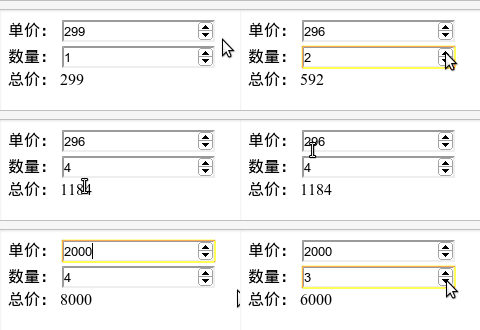
在 AngularJS 裡,所有在 View 與 Controller 之間,都是透過 Model 來做資料傳遞,無論你在 View 這端透過表單元素修改了內容,或是在 Controller 這端修改了 Model 內容,兩邊都會即時發生變化,因為在 AngularJS 框架中會監控 (watch) Model 物件的任何變化,並隨時反映到 View 上面,這就是雙向資料繫結。


<!DOCTYPE html>
<html ng-app>
<head>
  <meta charset="utf-8">
  <meta name="viewport" content="width=device-width">
  <script src="https://rawgit.com/angular/bower-angular/master/angular.min.js"></script>
  <title>JS Bin</title>
</head>
<body>
  數量: <input type="number" ng-model="quantity" ng-init="quantity = 1">
  <br>
  單價: <input type="number" ng-model="price" ng-init="price = 299">
  <br>
  總價: {{ quantity * price }}
</body>
</html>


在上述語法中,有兩個 input 欄位,都被 ng-model 屬性宣告成了 Model,屬性值中設定的事 Model 的變數名稱。不過,如果你試圖在 input 標籤設定 value 屬性與值,其屬性值並不會顯示在欄位裡,這是因為目前這個 input 欄位已經受到 Angular 所控制,所以欄位中的 value 一定會跟所設定的 Model 繫結,當 quantity 與 price 這兩個 Model 都沒有預設值時,因為雙向繫結的關係,會導致欄位並不會出現任何資料,這才需要透過 ng-init 來指定 Model 的預設值。


AngularJS 最佳實踐

AngularJS 是一個 Web 應用框架,它實現了前端的 MVC 架構,能讓開發人員很方便地實現業務邏輯。
舉個栗子,要做到下面的效果,以前可能需要寫一連串的 JavaScript 代碼綁定 N 多事件。而使用 AngularJS 框架,一句 JavaScript 都不用寫就能實現了,神奇吧?查看演示。
angularjs-demo
    <script type="text/javascript" src="//ajax.googleapis.com/ajax/libs/angularjs/1.0.7/angular.min.js"></script>
    <div data-ng-app>
        單價: <input type="number" min=0 ng-model="price" ng-init="price = 299">
        <br>
        數量: <input type="number" min=0 ng-model="quantity" ng-init="quantity = 1">
        <br>
        總價: {{ quantity * price }}
    </div>
這得益於 AngularJS 中的雙向數據綁定特性(Two Way Data-Binding),將 Model 和 View 自動關聯了起來,在更複雜的業務場景下,還有代碼分離的好處,將 DOM 操作和應用邏輯解耦,非常實用。
不過沒有銀彈,和其他框架一樣,AngularJS 也有它的局限。CRUD 類型的操作是它所擅長的,想想看以前寫過的管理後台,幾乎大部分都是從數據庫中讀取數據,然後呈現在頁面上,進行各種增刪改查。AngularJS 約定了一套規範(約定優於配置),於是你可以很便捷地操作數據。而在其他方面,例如開發複雜的 Web 遊戲,AngularJS 則是無用武之地了。

一、AngularJS 中的精美特性

雙向綁定

上面的例子已經說明了,我們可以像 PHP Smarty 模板一樣在 HTML 中寫表達式,用 {{ 和 }} 包起來。在 AngularJS 里,View 和 Model 是在 Controller 裡面綁定的,所以無論你在 View 的表單中修改了內容,還是在 Controller 里通過代碼修改了 Model 值,兩邊都會即時發生變化,同步更新。因為 AngularJS 會監控 (watch) Model 對象的變化,隨時反映到 View 中。

Filter

Filter 類似 Unix 裡面的 | 管道概念,AngularJS 把它搬到了前端。還是舉個例子,你們感受一下——
<div>{{ 9999 | number }}</div>
<div>{{ 9999+1 | number:2 }}</div>
<div>{{ 9*9 | currency }}</div>
<div>{{ 'Hello World' | uppercase }}</div>
輸出結果:
9,999
10,000.00
$81.00
HELLO WORLD

二、AngularJS 中的一些“坑”

由於過去寫 JavaScript 的習慣使然,人們很容易掉進一些 AngularJS 的陷阱里。下面的內容假設你已經了解前端 MVC 概念,並對 AngularJS 有了一定經驗,初學者讀起來可能比較艱深晦澀。

DOM 操作

避免使用 jQuery 來操作 DOM,包括增加元素節點,移除元素節點,獲取元素內容,隱藏或顯示元素。你應該使用 directives 來實現這些動作,有必要的話你還要編寫自己的 directives。
如果你感到很難改變習慣,那麼考慮從你的網頁中移除 jQuery 吧。真的,AngularJS 中的 $http 服務非常強大,基本可以替代 jQuery 的 ajax 函數,而且 AngularJS 內嵌了 jQLite —— 它內部實現的一個 jQuery 子集,包含了常用的 jQuery DOM 操作方法,事件綁定等等。但這並不是說用了AngularJS 就不能用 jQuery 了。如果你的網頁有載入 jQuery 那麼 AngularJS 會優先採用你的 jQuery,否則它會 fall back 到 jQLite。
需要自己編寫 directives 的情況通常是當你使用了第三方的 jQuery 插件。因為插件在 AngularJS 之外對錶單值進行更改,並不能即時反應到 Model 中。例如我們用得比較多的 jQueryUI datepicker 插件,當你選中一個日期後,插件會將日期字符串填到 input 輸入框中。View 改變了,卻並沒有更新 Model,因為 $('.datepicker').datepicker(); 這段代碼不屬於 AngularJS 的管理範圍。我們需要編寫一個directive 來讓 DOM 的改變即時更新到 Model 里。
var directives = angular.module('directives', []);
 
directives.directive('datepicker', function() {
   return function(scope, element, attrs) {
       element.datepicker({
           inline: true,
           dateFormat: 'dd.mm.yy',
           onSelect: function(dateText) {
               var modelPath = $(this).attr('ng-model');
               putObject(modelPath, scope, dateText);
               scope.$apply();
           }
       });
   }
});
然後在 HTML 中引入這個 direcitve
<input type="text" datepicker ng-model="myObject.myDateValue" />
說白了 directive 就是在 HTML 里寫自定義的標籤屬性,達到插件的作用。這種聲明式的語法擴展了 HTML。
需要說明的是,有一個 AngularUI 項目提供了大量的 directive 給我們使用,包括 Bootstrap 框架中的插件以及基於 jQuery 的其他很熱門的 UI 組件。我之前說過 AngularJS 的社區很活躍嘛,生態系統健全。

ngOption 中的 value

這是個大坑。如果你去查看 ngOption 生成的 <select> 中的 <option> 的選項值(每個 <option value="xxx"> 的 value 部分),那絕對是枉費心機。因為這裡的值永遠都會是 AngularJS 內部元素的索引,並不是你所指定的表單選項值。
還是要轉變觀念,AngularJS 已經不再用表單進行數據交互了,而是用 Model。使用 $http 來提交 Model,在 php 中則使用 file_get_contents('php://input') 來獲取前端提交的數據。

{{ }} 的問題

在頁面初始化的時候,用戶可能會看到 {{ }},然後閃爍一下才出現真正的內容。
解決辦法:
  1. 使用 ng-cloak directive 來隱藏它
  2. 使用 ng-bind 替代 {{ }}

將界面與業務邏輯分離

Controller 不應該直接引用 DOM,而應該控制 view 的行為。例如“如果用戶操作了 X,應該發生什麼事情”,“我從哪裡可以獲得 X?”
Service 在大部分情況下也不應該直接引用 DOM,它應該是一個單例(singletons),獨立於界面,與 view 的邏輯無關。它的角色只是“做 X 操作”。
DOM 操作應該放在 directives 裡面。

盡量復用已有功能

你所寫的功能很可能 AngularJS 已經實現了,有一些代碼是可以抽象出來複用的,使用更 Angular 的方式。總之就是很多 jQuery 的繁瑣代碼可以被替代。
1. ng-repeat
ng-repeat 很有用。當 Ajax 從服務器獲得數據後,我們經常使用 jQuery (比如上面講過的例子) 向某些 HTML 容器節點中添加更多的元素,這在 AngularJS 里是不好的做法。有了 ng-repeat 一切就變得非常簡單了。在你的 $scope 中定義一個數組 (model) 來保存從服務器拉取的數據,然後使用 ng-repeat 將它與 DOM 綁定即可。下面的例子初始化定義了 friends 這個 model
<div ng-init="friends = [{name:'John', age:25}, {name:'Mary', age:28}]">
    I have {{friends.length}} friends. They are:
    <ul>
        <li ng-repeat="friend in friends">
            [{{$index + 1}}] {{friend.name}} who is {{friend.age}} years old.
        </li>
    </ul>
</div>
顯示結果
I have 2 friends. They are:
  [1] John who is 25 years old.
  [2] Mary who is 28 years old.
2. ng-show
ng-show 也很有用。使用 jQuery 來根據條件控制界面元素的顯示隱藏,這很常見。但是 Angular 有更好的方式來做到這一點。ng-show (以及 ng-hide) 可以根據布爾表達式來決定隱藏和顯示。在 $scope 中定義一個變量:
<div ng-show="!loggedIn">
    點擊 <a href="#/login">這裡</a> 登錄
</div>
類似的內置 directives 還有 ng-disabled, ng-switch 等等,用於條件控制,語法簡潔,都很強大。
3. ng-class
ng-class 用於條件性地給元素添加 class,以前我們也經常用 jQuery 來實現。Angular 中的 ng-class 當然更好用了,例子:
<div ng-class="{ errorClass: isError, warningClass: isWarning, okClass: !isError && !isWarning }">...</div>
在這裡 ng-class 接受一個 object 對象,key 為 CSS class 名,值為 $scope 變量控制的條件表達式,其他類似的內置 directives 還有 ng-class-even 和 ng-class-odd,很實用。

$watch 和 $apply

AngularJS 的雙向數據綁定是最令人興奮的特性了,然而它也不是全能的魔法,在某些情況下你需要做一些小小的修正。
當你使用 ng-model, ng-repeat 等等來綁定一個元素的值時, AngularJS 為那個值創建了一個 $watch,只要這個值在 AngularJS 的範圍內有任何改變,所有的地方都會同步更新。而你在寫自定義的 directive 時,你需要定義你自己的 $watch 來實現這種自動同步。
有時候你在代碼中改變了 model 的值,view 卻沒有更新,這在自定義事件綁定中經常遇到。這時你就需要手動調用 scope.$apply() 來觸發界面更新。上面 datepicker 的例子已經說明了這一點。第三方插件可能會有 call back,我們也可以把回調函數寫成匿名函數作為參數傳入$apply()中。

將 ng-repeat 和其他 directives 結合起來

ng-repeat 很有用,不過它和 DOM 綁定了,很難在同一個元素上使用其他 directives (比如 ng-show, ng-controller 等等)。
如果你想對整個循環使用某個 directive,你可以在 repeat 外再包一層父元素把 directive 寫在那兒;如果你想對循環內部的每一個元素使用某個 directive,那麼把它放到 ng-repeat 的一個子節點上即可。

Scope

Scope 在 templates 模板中應該是 read-only 的,而在 controller 里應該是 write-only 的。Scope 的目的是引用 model,而不是成為 model。model 就是我們定義的 JavaScript 對象。

$rootScope 是可以用的,不過很可能被濫用

Scopes 在 AngularJS 中形成一定的層級關係,樹狀結構必然有一個根節點。通常我們用不到它,因為幾乎每個 view 都有一個 controller 以及相對應的自己的 scope。
但偶爾有一些數據我們希望全局應用在整個 app 中,這時我們可以將數據注入 $rootScope。因為其他 scope 都會繼承 root scope,所以那些注入的數據對於 ng-show 這類 directive 都是可用的,就像是在本地 $scope 中的變量一樣。
當然,全局變量是邪惡的,你必須很小心地使用 $rootScope。特別是不要用於代碼,而僅僅用於注入數據。如果你非常希望在 $rootScope 寫一個函數,那最好把它寫到 service 里,這樣只有用到的時候它才會被注入,測試起來也方便些。
相反,如果一個函數的功能僅僅是存儲和返回一些數據,就不要把它創建成一個 service。

三、AngularJS 項目的目錄結構

怎樣組織代碼文件和目錄?這恐怕是初學者一開始就會遇到的問題。AngularJS 應用開發的官方入門項目 angular-seed,其文件結構是這樣的:
  • css/
  • img/
  • js/
    • app.js
    • controllers.js
    • directives.js
    • filters.js
    • services.js
  • lib/
  • partials/
這種結構對於一個簡單的單頁 app 來說是可行的,只是一旦代碼中存在多個 Controller 或者 Service,就很難找到想要尋找的對象了。我們可以對文件按照業務邏輯進行拆分,就像下面這樣:
  • controllers/
    • LoginController.js
    • RegistrationController.js
    • ProductDetailController.js
    • SearchResultsController.js
  • directives.js
  • filters.js
  • models/
    • CartModel.js
    • ProductModel.js
    • SearchResultsModel.js
    • UserModel.js
  • services/
    • CartService.js
    • UserService.js
    • ProductService.js
這種結構把不同的業務功能拆分為獨立的文件,條理清晰,但是仍有一定的局限性。最大的問題是一個業務功能的代碼分布在controllers, models, servers 三個不同目錄下,要從中挑出正確的文件,建立起代碼關聯,還是有些麻煩。按照功能進行模塊化劃分目錄結構,應該要更為合理一些:
  • cart/
    • CartModel.js
    • CartService.js
  • common/
    • directives.js
    • filters.js
  • product/
    • search/
      • SearchResultsController.js
      • SearchResultsModel.js
    • ProductDetailController.js
    • ProductModel.js
    • ProductService.js
  • user/
    • LoginController.js
    • RegistrationController.js
    • UserModel.js
    • UserService.js
這樣也是適合 RequireJS 等模塊加載器的自然直觀的代碼組織方式。
參考鏈接:


From: https://www.lovelucy.info/angularjs-best-practices.html